


Best Laser Projectors for Projection Mapping: Essential Buying Guide
Choosing between the best laser projectors for projection mapping comes down to matching brightness, optics and geometry correction to the surface you actually have to cover. Whether that surface is a building façade, a stage set, a museum gallery or a fully immersive room, the projector decides how far a design can be pushed before the image loses definition. This guide sets out what makes a laser projector genuinely effective for mapping work, which models are worth considering at each budget level, their strengths and limitations, and how to read the specifications that matter.
Why laser light sources suit projection mapping work
Projection mapping means throwing an image onto complex surfaces, textured cladding or three-dimensional shapes. That is why a laser projector for projection mapping has to deliver the output, precision and reliability this kind of work demands. A generic projector is not enough: the unit has to hold its image quality in difficult conditions and across long operating days.
These are the reasons laser projectors have become the default choice for creative and professional installations:
-
Long service life and reduced maintenance: laser sources reach tens of thousands of hours without substantial degradation.
-
Consistent light output: brightness holds far more steadily over prolonged use than in traditional lamp-based projectors.
-
Purer colour reproduction: laser systems, and RGB or tri-laser designs in particular, deliver wider, more saturated colour gamuts.
-
Instant power-up and shutdown: no warm-up period and no prolonged cool-down cycle.
-
Capacity for high luminance: well suited to outdoor installations or spaces with significant ambient light.
The specifications set out below are the ones to weigh up when selecting a projector, so that the finished installation achieves the visual impact you are aiming for.
Key specifications to weigh up in a projection mapping projector
These are the characteristics that determine sharpness and stability in a professional projection mapping projector, and the ones worth comparing model by model before committing to a purchase.
Resolution and image quality
For mapping, native 4K resolution (3840×2160 or higher) is the ideal starting point, as it preserves fine detail and gives better visual coverage on large installations. That resolution is what allows a 4K laser projector for mapping to hold precise definition even across irregular surfaces.
Brightness: ANSI and ISO lumens in real conditions
The lumen figure has to be matched to the environment. Outdoor mapping and large open spaces call for high values running into several thousand lumens, whereas a controlled indoor room will work perfectly well with considerably less. Note that manufacturers quote either ANSI lumens or ISO lumens, so compare like with like when shortlisting models.
Laser source type and colour performance
-
Laser phosphor (blue laser plus phosphor wheel): the most common design and the strongest on value for money.
-
Pure RGB or tri-laser (separate red, green and blue sources): greater colour accuracy and saturation, and the better fit for demanding mapping work.
Interchangeable lenses, throw ratio and short throw optics
The optical system matters as much as the light engine. Support for interchangeable lenses, or the availability of short throw and ultra-short throw (UST) options, makes installation far easier in confined spaces. These choices let you adapt the same laser projector for architectural mapping to different distances and surface sizes without giving up image quality.
Warping, edge blending and geometric alignment
Warping, 3D warping, edge blending and automated or assisted alignment tools, including calibration cameras, make a substantial difference to how efficiently complex installations come together.
Contrast, uniformity and maintenance
Look for high contrast ratios, even illumination across the frame, and sealed optical assemblies that keep dust out of the light path.
Comparing laser projectors for mapping: compact and mid-range models
These are compact and advanced commercial units rather than large-venue equipment, and they cover the entry and mid points of the market for video mapping and smaller installations. All prices are indicative.
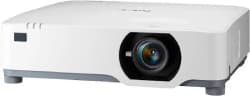
Sharp NP-P627UL Laser WUXGA
Indicative price: €2,307
Around 6,200 lumens at WUXGA resolution (1920×1200). The brightness headroom makes it a practical choice for mid-sized mapping work backed by robust laser engineering.
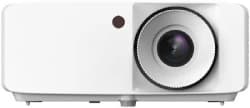
Optoma HZ40HDR
Indicative price: €1,061.35
A hybrid solution with HDR input, useful when the same unit also has to handle conventional playback rather than being dedicated exclusively to mapping.
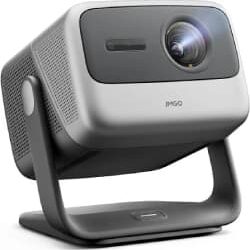
JMGO N1 Ultra Triple Laser
Indicative price: €1,099
A more compact option built around triple laser technology, better suited to smaller or mobile installations where transport weight and quick repositioning count.
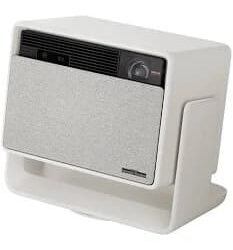
XGIMI RS 10 Pro 4K Laser
Indicative price: €1,062.38
Adds 4K resolution and intelligent focus, which pays off when mapping detailed interior surfaces in a properly equipped, light-controlled space.
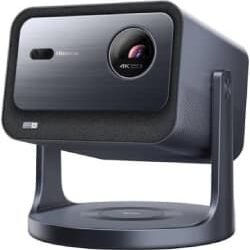
Hisense C2 4K Laser
Indicative price: €1,289
From an established manufacturer, it works well as a complementary or secondary projector within an integrated mapping setup rather than as the primary source.
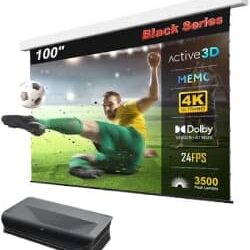
AWOL Vision LTV-3500 Pro
Indicative price: €6,793
An ultra-short throw design with considerable light output, genuinely useful when the available projection distance is limited and rigging a long-throw unit is not an option.
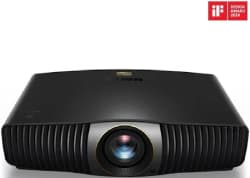
BenQ W5800 4K Laser
Indicative price: €3,990
The laser version of a popular BenQ platform, well balanced across resolution, brightness and optics for indoor mapping.
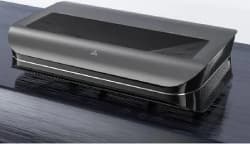
AWOL Vision LTV-2500 Triple Laser 4K
Indicative price: €1,862.15
Another capable ultra-short throw unit, pairing a triple laser source with strong performance in compact spaces.
Professional and industrial laser projectors for large-scale mapping
Beyond these more accessible commercial options, specialist manufacturers build projection systems designed from the outset for professional mapping at scale:
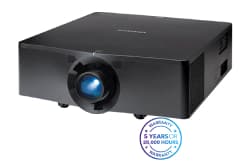
Christie 4K7-HS
Estimated price: €20,000 – €30,000
7,600 lumens at 4K UHD, with BoldColor technology and a comparatively light chassis for demanding installations that still have to be rigged and moved.
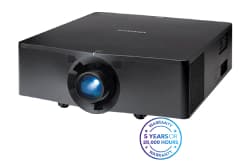
Christie 4K13-HS
Estimated price: €30,000 – €50,000
A substantial step up in output at 14,800 ISO lumens, with striking contrast once RealBlack™ is enabled.
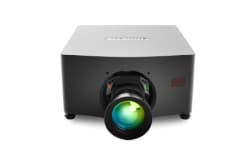
Christie M 4K RGB
Estimated price: €50,000 – €100,000
A pure laser RGB series reaching up to 25,300 lumens with interchangeable optics, designed specifically for projection mapping and 3D projection.
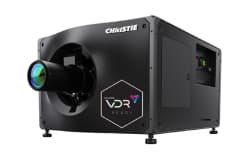
Christie CP4435 / CP4455 (cinema)
Estimated price: from €80,000
4K cinema projectors with very high light output, up to 35,000 lumens, and an excellent colour gamut. Useful for mapping across massive spaces and within integrated shows.
As a real-world example, Christie projection technology also underpins large-format immersive projects such as Atlas9, the immersive experience created by Dimensional Innovation with Christie technology (article in Spanish), where laser projectors and alignment software combine to build precise, enveloping visual environments across complex surfaces.
These figures are indicative professional market prices, referenced to the Spanish market at the time the original Spanish edition of this guide was written. The final cost varies according to the configuration, lenses, accessories and services included. For a firm quotation, speak to an authorised dealer.
Advantages and limitations of laser projection
Understanding where laser projection helps and where it costs you is the quickest way to judge whether the technology is right for your type of installation or event.
Advantages
-
Low maintenance and a longer service life
-
More consistent and more efficient brightness
-
Excellent colour reproduction
-
Immediate response on power-up and shutdown
-
Dependable performance in demanding installations
Limitations
-
Higher purchase price than lamp-based projectors
-
Some ultra-short throw and compact units trade away brightness
-
Fine calibration is essential when projecting onto complex surfaces
-
On entry-level models, the optics or geometry correction may be limited
Practical decisions behind a projection mapping installation
Laser projectors versus lamp projectors
The main differences lie in service life, stability and maintenance. A laser projector for projection mapping delivers a more uniform output over time and needs fewer replacements or adjustments than a lamp-based system, which matters most on installations that run for weeks rather than hours.
How a laser projector produces its image
A laser projector generates light with a blue laser diode that excites a phosphor wheel, or with separate RGB laser modules. That light then passes through micromirrors (DLP) or other optical systems to form the image. There are no filaments or gases to wear out as there are in traditional lamps.
Projection surfaces and screen materials for mapping
For mapping, the strongest results usually come from semi-reflective surfaces, surfaces treated with specialist projection paint, or projection fabrics that minimise scatter and maximise uniformity. There are also mapping projection screens (article in Spanish) made from translucent meshes or technical vinyls engineered not to shift colour.
Leading projector brands in the mapping market
Alongside Christie, manufacturers such as Epson, Barco, Panasonic, BenQ, Optoma, XGIMI and Hisense are all active in the laser projector market. Each strikes a different balance between price, brightness, optics and calibration features.
Renting versus purchasing a mapping projector
If the project is a one-off, hiring is often the sensible route. Local rental companies give you access to high-end equipment without the full capital outlay, which suits events, festivals and short-run installations. When comparing quotations, ask specifically about the lenses included, rigging hardware and on-site technical support, since those are usually what separate one offer from another.
Which laser projector suits each type of mapping project
Every projection environment sets its own requirements for brightness, optics and throw distance. Matching the projection mapping projector to the venue is what keeps the result sharp and visually convincing.
| Scenario | Recommendation |
|---|---|
| Large-scale architectural projection mapping | Professional-grade projectors (Christie, Barco) with high lumen output and interchangeable optics |
| Façades and outdoor events | High-output professional units with long-throw optics and suitable outdoor protection, sized for the ambient light on site |
| Controlled indoor spaces with low ambient light | UST or RGB laser models with good contrast (for example the Hisense PX3-PRO) |
| Immersive rooms and multi-projector environments | RGB laser projectors with edge blending and warping, such as the Christie M 4K RGB series |
| Mobile or artistic projects | Compact units with good geometry correction and a manageable weight |
| Limited budgets | Mid-range laser options with basic calibration, prioritising optics and maintenance |
| Permanent professional installations | Sealed, low-maintenance laser projectors with interchangeable lenses and a documented service life |
Taking your projection mapping project forward with the right equipment
The most expensive projector is rarely the right one. What matters is the unit that aligns resolution, brightness, optics and calibration features with the installation actually in front of you. On an architectural show, an immersive room or a cultural installation, that decision is usually what separates a striking result from a washed-out one.
Would you like to appear in Instalia?
Bring your audiovisual products, services and installations in front of a specialist professional audience. Manufacturers, distributors, integrators and AV companies use our portal to reach the people who specify, install and buy this equipment.
Have any questions?
If you need information about any of our services or rates, please do get in touch. Call our offices directly or fill in the contact form and we will be glad to help.
instalia@instalia.eu